Show readme 4 kB
cliui



easily create complex multi-column command-line-interfaces.
Example
npm i cliui@latest chalk@latest
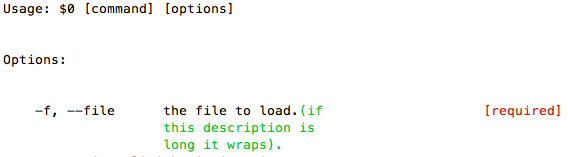
const ui = require('cliui')()
const {Chalk} = require('chalk');
const chalk = new Chalk();

ui.div('Usage: $0 [command] [options]')

ui.div({
  text: 'Options:',
  padding: [2, 0, 1, 0]
})

ui.div(
  {
    text: "-f, --file",
    width: 20,
    padding: [0, 4, 0, 4]
  },
  {
    text: "the file to load." +
      chalk.green("(if this description is long it wraps).")
    ,
    width: 20
  },
  {
    text: chalk.red("[required]"),
    align: 'right'
  }
)

console.log(ui.toString())
Deno/ESM Support
As of v7 cliui supports Deno and
ESM:
import cliui from "cliui";
import chalk from "chalk";
// Deno: import cliui from "https://deno.land/x/cliui/deno.ts";

const ui = cliui({})

ui.div('Usage: $0 [command] [options]')

ui.div({
  text: 'Options:',
  padding: [2, 0, 1, 0]
})

ui.div(
  {
    text: "-f, --file",
    width: 20,
    padding: [0, 4, 0, 4]
  },
  {
    text: "the file to load." +
      chalk.green("(if this description is long it wraps).")
    ,
    width: 20
  },
  {
    text: chalk.red("[required]"),
    align: 'right'
  }
)

console.log(ui.toString())
Layout DSL
cliui exposes a simple layout DSL:
If you create a single ui.div, passing a string rather than an
object:
\n: characters will be interpreted as new rows.\t: characters will be interpreted as new columns.\s: characters will be interpreted as padding.
as an example...
var ui = require('./')({
  width: 60
})

ui.div(
  'Usage: node ./bin/foo.js\n' +
  '  <regex>\t  provide a regex\n' +
  '  <glob>\t  provide a glob\t [required]'
)

console.log(ui.toString())
will output:
Usage: node ./bin/foo.js
  <regex>  provide a regex
  <glob>   provide a glob          [required]
Methods
cliui = require('cliui')
cliui({width: integer})
Specify the maximum width of the UI being generated.
If no width is provided, cliui will try to get the current window's width and use it, and if that doesn't work, width will be set to 80.
cliui({wrap: boolean})
Enable or disable the wrapping of text in a column.
cliui.div(column, column, column)
Create a row with any number of columns, a column can either be a string, or an object with the following options:
- text: some text to place in the column.
- width: the width of a column.
- align: alignment,
rightorcenter. - padding:
[top, right, bottom, left]. - border: should a border be placed around the div?
cliui.span(column, column, column)
Similar to div, except the next row will be appended without
a new line being created.
cliui.resetOutput()
Resets the UI elements of the current cliui instance, maintaining the values
set for width and wrap.